
Architecture
Strum VOD is a modern, serverless Video on Demand (VOD) platform built on Cloudflare infrastructure and managed Postgres.
The monorepo (pnpm workspaces) is organized into:
- Applications:
apps/api-edge(Cloudflare Workers, Hono REST API + MCP Server + Edge Response Cache)apps/tus-edge(Cloudflare Workers, TUS resumable upload gateway)apps/transcoder(Go unified transcode worker: FFmpeg HLS ladder 360p–2160p + audio & thumbnails)apps/trigger-tasks(Trigger.dev: durable task orchestration for AI pipeline, background sync, and crons)apps/dashboard(Cloudflare Workers + Assets, Vite React management console)apps/player(Cloudflare Pages, Vite React standalone video player)apps/landing(Cloudflare Pages, Astro marketing site)
- Shared Packages:
packages/edge-cache(Cloudflare Cache APIcaches.default, native/in-memory rate limiting, media headers)packages/db(Drizzle schema + Neon HTTP Postgres client)packages/email(OTP & transactional email templates via Resend)packages/subtitles(VTT/SRT subtitle generation & parser)packages/player-ui(React player core and controls; Mux Data QoE monitoring viamux-embed, optional)packages/design-tokens(Shared CSS tokens and theme variables)packages/ai-providers(AI provider registry: Deepgram, Whisper, Demucs, LLMs)packages/costs(Cost estimation engine)packages/api-client(Typed Hono RPC client factory +unwraphelper, consumed by the dashboard)
System Overview
Browser / Client
  ├── Dashboard (CF Workers + Assets)               → Hono RPC →  apps/api-edge (vapi.usestrum.app)
  └── Player app (CF Pages)                         → REST     →  apps/api-edge
  └── Video Stream (HLS.js / Safari)                → CDN      →  Cloudflare Edge Cache / R2

Upload paths:
  Standard:  Browser ──presigned PUT──────────────────────────────────▶ R2 (strum-vod)
  Resumable: Browser ──TUS──▶ apps/tus-edge ──S3 multipart────────────▶ R2

Transcode & Orchestration pipeline:
  apps/api-edge ──triggers task──▶ apps/trigger-tasks (transcode-orchestration)
  apps/transcoder (Go) ──claims job──▶ apps/api-edge /v1/worker-agent/jobs/claim
      └─▶ download source → FFmpeg HLS ladder → presigned PUT (with Cache-Control) to R2
      └─▶ apps/api-edge /v1/worker-agent/jobs/:id/complete
          └─▶ triggers ai-pipeline task (trigger.dev) + resolves wait token + busts edge cache

Data stores & Infrastructure:
  Postgres (Neon)  — collections, assets, renditions, jobs, ai_jobs, highlights, analytics, webhooks
  Cloudflare Edge  — native Cache API (caches.default) + Tiered Cache (no external Redis)
  Cloudflare R2    — media storage (sources, HLS playlists/segments, thumbnails, AI transcripts)
Everything on Cloudflare (R2 buckets, the Dashboard and Player Workers) is deployed with wrangler — see apps/*/wrangler.toml. R2 bucket CORS is applied from the repo with pnpm r2:cors:set (config in infra/r2/); it is a bucket-level setting that must be re-applied if the bucket is ever recreated. Frontends run in local dev on Vite (http://localhost:42901 dashboard, http://localhost:42911 player).
Diagrams
Static renders of the repo's mermaid diagrams. The source of truth is the mermaid blocks in CLAUDE.md (and infra/modal-whisper/README.md), which GitHub renders directly — these PNG/SVG copies exist for contexts that can't (PDFs, printed docs, issue embeds). Keep the mermaid source canonical and regenerate rather than editing the images.
Transcode → AI → webhook pipeline
The full flow from upload (presigned PUT / TUS) to HLS delivery on R2, AI processing — including the async Modal transcription loop (dispatch → signed callback → resume) — and asset.ready/asset.error domain webhooks. Job routing is via QStash (publish → signed /qstash/* HTTP consumers).


Async Modal transcription
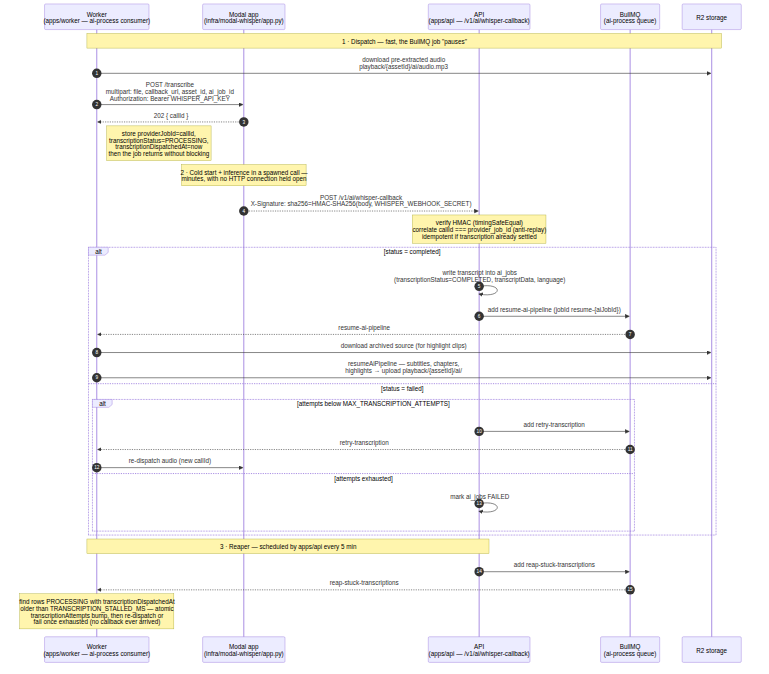
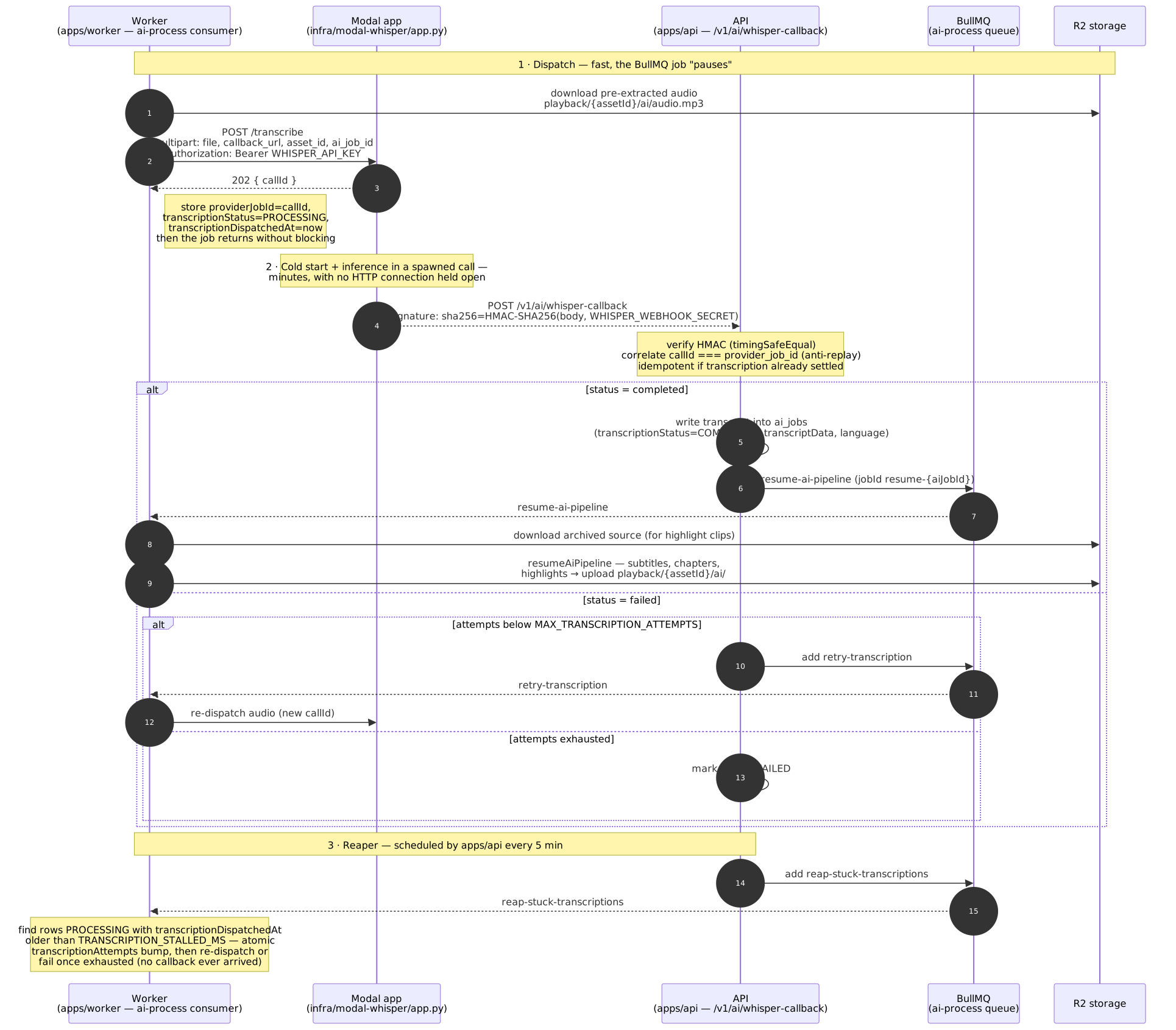
The dispatch → 202 {callId} → cold-start/inference (spawned call) → HMAC-signed callback → resume/retry/reaper sequence for the self-hosted Modal Whisper provider (infra/modal-whisper/app.py).
SVG: modal-whisper-sequence.svg
Asset lifecycle
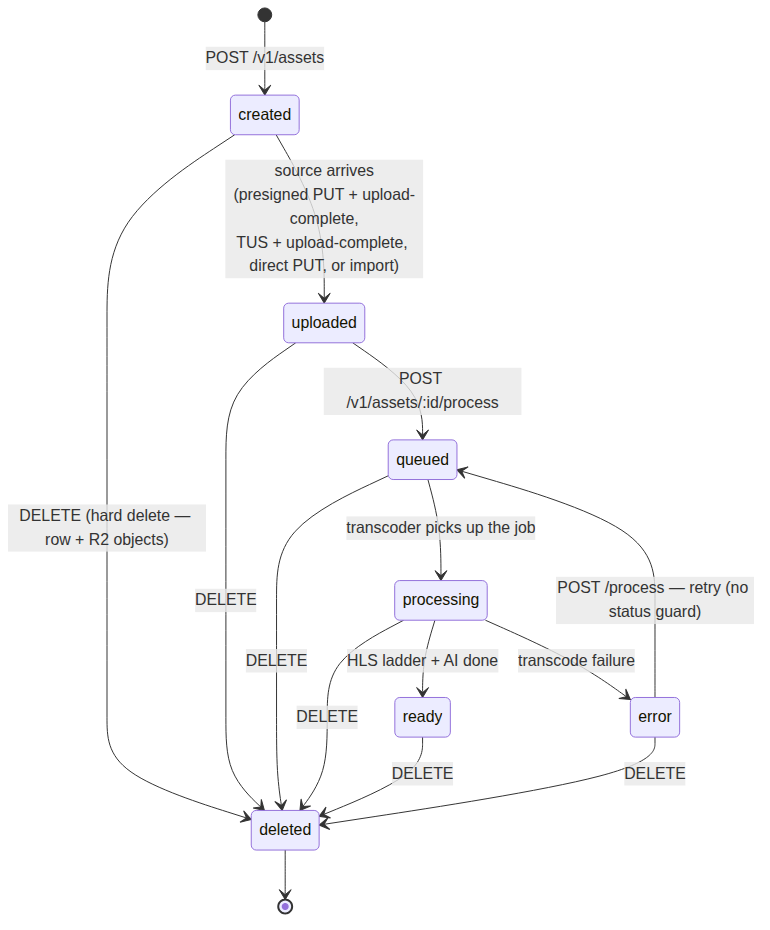
The state machine of an asset: created → uploaded → queued → processing → ready | error, with the hard-delete terminal and the error-retry path (POST /process has no status guard).
SVG: asset-lifecycle.svg

Regenerating the images
# Requires @mermaid-js/mermaid-cli (headless Chrome via puppeteer):
#   npm i -g @mermaid-js/mermaid-cli
# GitHub Actions runners also need --no-sandbox:
#   echo '{"args":["--no-sandbox","--disable-setuid-sandbox"]}' > puppeteer.json

# 1. Extract the ```mermaid block to a .mmd file:
#    CLAUDE.md block 1 → transcode-pipeline, block 2 → modal-whisper-sequence,
#    block 3 → asset-lifecycle
awk -v T=1 '/^```mermaid$/{n++; f=(n==T); next} /^```$/{if(f) exit} f' CLAUDE.md > pipeline.mmd
awk -v T=2 '/^```mermaid$/{n++; f=(n==T); next} /^```$/{if(f) exit} f' CLAUDE.md > sequence.mmd
awk -v T=3 '/^```mermaid$/{n++; f=(n==T); next} /^```$/{if(f) exit} f' CLAUDE.md > asset.mmd

# 2. Render SVG + PNG (pass -w/-H from the SVG's viewBox so wide diagrams
#    aren't cropped to mermaid-cli's default 800x600 viewport)
mmdc -i pipeline.mmd -o docs/diagrams/transcode-pipeline.svg  -p puppeteer.json
mmdc -i pipeline.mmd -o docs/diagrams/transcode-pipeline.png  -p puppeteer.json -w 4247 -H 762
mmdc -i sequence.mmd -o docs/diagrams/modal-whisper-sequence.svg -p puppeteer.json
mmdc -i sequence.mmd -o docs/diagrams/modal-whisper-sequence.png -p puppeteer.json -w 785 -H 675
mmdc -i asset.mmd    -o docs/diagrams/asset-lifecycle.svg    -p puppeteer.json
mmdc -i asset.mmd    -o docs/diagrams/asset-lifecycle.png    -p puppeteer.json -w 991 -H 932
The modal sequence diagram is duplicated (intentionally) in CLAUDE.md and infra/modal-whisper/README.md; both render to the same image.
Apps
apps/api — REST API
Stack: Fastify + TypeScript · DB: Postgres (Neon) · Deploy: Fly.io / Docker
The central entry point for all asset management. Handles CRUD, generates presigned upload URLs, serves the resumable TUS upload endpoint, publishes transcode jobs to QStash, serves playback info, and consumes the /qstash/webhook delivery endpoint.
Key files:
src/routes/assets.ts— asset endpoints:upload-url,upload-token,upload-complete,upload,import,process(no status guard — retry fromerrorworks), hard-delete (row + R2 objects, FK CASCADE), search, thumbnail upload/reset, downloads, audio, transcript/chapters/highlightssrc/routes/collections.ts— collections (video folders) CRUD + per-collection countssrc/routes/tus.ts— resumable upload (/upload/videos) via@tus/server+@tus/s3-store; verifies theupload-tokenJWT on every requestsrc/routes/ai.ts— AI job management +POST /v1/ai/whisper-callback(receives the HMAC-signed async transcription result from Modal and publishes the resume/retry jobs to the worker's/qstash/ai)src/routes/qstash.ts— signed QStash consumers:/qstash/webhook(deliversasset.ready,asset.error,asset.deleted,ai.completed,ai.failedviaprocessWebhookDelivery) and/qstash/cron/*(node reaper, cost snapshots)src/routes/playback.ts— public/v1/playback/:playbackIdresolutionsrc/routes/analytics.ts/stats.ts— analytics ingestion + aggregation readssrc/routes/orgs.ts,auth.ts,billing.ts,settings.ts(incl. the registry-metadata endpointGET /v1/admin/settings/ai/providers),comments.ts,backups.ts,health.tssrc/services/qstash.ts— QStash publish/schedule helpers + queue-lag reads (Events API), used byworker-status.tssrc/db.ts— Postgres pool + raw SQL migrations (CREATE TABLE IF NOT EXISTS…)src/env.ts— Zod-validated env (incl.SHARED_AUTH_SECRETfor TUS JWTs)
apps/worker — Node QStash consumers + AI + analytics
Stack: Node (HTTP consumers) · Deploy: Fly.io / Docker
The Node worker no longer transcodes and has no queue infrastructure — it is an HTTP server whose /qstash/* endpoints are driven by QStash (durable, retried, signature-verified). Consumers:
/qstash/ai— the AI pipeline (handleAiJob): downloadsai/audio.mp3+ archived source from R2 and runssrc/ai/process.ts: transcription (local OpenAI-compatible Whisper, Modal async dispatch + signed webhook callback with retry/reaper, or Deepgram), subtitle, chapter, and highlight-clip generation (ffmpeg still shelled out only for clip cutting), plus the translation step (ISO-639-1, context-aware sliding window ±2). The same function also handlesresume-ai-pipeline,retry-transcriptionand the reapers by job-name./qstash/cron/analytics—runAnalyticsJobaggregates player events intoanalytics_daily/analytics_asset_stats(retention curve, engagement score, peak hour). Quality distribution and the heatmap are not aggregated here —apps/apicomputes both live fromanalytics_events; see Real-Time Analytics./qstash/cron/ai-reaper— the stuck-modal-transcription/separation reapers./qstash/backup—runDbBackup(pg_dump→ R2 backups bucket) + 30-day cleanup, driven by the QStashstrum-vod-db-backupdaily schedule./qstash/org-delete—processOrgDelete(R2 + DB cleanup for deleted orgs).
QStash schedules (registered idempotently by apps/api at boot) drive the cron consumers above. AI config (TRANSCRIPTION_PROVIDER ∈ local|modal|deepgram, WHISPER_API_URL, API_PUBLIC_URL for the Modal callback target, LLM_* for chapters/highlights) lives in src/env.ts.
apps/transcoder — Go transcode ladder
Stack: Go + ffmpeg/ffprobe/yt-dlp · Deploy: Fly.io, scale-to-zero (min_machines_running=0) — woken in parallel with the worker on job enqueue (prewarmFleet), self-stopped by internal/selfstop when idle (see Deployment)
Consumes POST /qstash/jobs (QStash-published, signature-verified via internal/qstash, semaphore-limited concurrency — retries and delivery are QStash's job). Per job:
- Source resolution (3-tier): local shared volume → yt-dlp URL import → S3 fallback
- HLS ladder — 7 renditions 360p–4320p (see Transcoding Profiles), each filtered to the source's short side (
FilterLadder, portrait-safe), H.264/HEVC, CPU or VA-API hardware acceleration, encoded in a single ffmpeg pass (decode once,filter_complexsplit, parallel HLS outputs) - Thumbnails — poster
thumbnail.jpg(25% duration) + tiled sprite sheetsthumbnails/sprite_%03d.jpg(~100 thumbs per file, one ffmpeg pass)thumbnails/thumbnails.vttscrub-bar index referencing each tile
- Audio — playback
audio.m4a(AAC 128k, 48kHz, stereo) and AIai/audio.mp3(mono 16kHz, 64k) - Downloadable MP4 — fast remux of each rendition (
download.mp4, no re-encode) - Uploads everything to R2, marks the asset
ready+ archives the source, then publishes the AI dispatch to the worker's/qstash/aiand the domain event to the API's/qstash/webhookvia QStash
Hardware-adaptive: auto-detects CPU/RAM (cgroup-aware) to size concurrency, ffmpeg threads, and pool sizes.
apps/dashboard — Management Dashboard
Stack: React + Vite + Tailwind CSS v4 · Deploy: Cloudflare Worker + Assets (SPA) via wrangler
Authenticated SPA for managing assets, AI configuration, and monitoring transcoding. Local dev: http://localhost:42901.
- Upload videos via presigned URL or resumable TUS (toggle in
NewVideoPage.tsx) - Import videos from external URLs
- Monitor transcoding status (polls every 5s) + AI job per-step status
- Full video management: title, description, thumbnail, AI transcript editing
- Organize videos into collections (folders)
- Settings: AI provider config (transcription provider local/Modal/Deepgram/ AssemblyAI + LLM provider + API keys — stored in
settings.ai_config). The AI form is registry-driven: it renders from the serialized provider registry served byGET /v1/admin/settings/ai/providers(packages/ai-providers), so adding a provider to the registry adds it to the form with no frontend change - Installable PWA (manifest + Workbox SW, safe-area-aware layout)
- Also serves
/embed/:playbackIdand/watch/:playbackId(and/player/*) on the same origin for convenience — the canonical public embeds live in the player app
API Communication — Hono RPC
All dashboard→API calls go through the typed Hono RPC client from packages/api-client, not hand-crafted fetch strings. Import from src/lib/api.ts:
import { apiClient, unwrap } from '../lib/api.js';

// GET with query params
const config = await unwrap(apiClient.v1.config.$get({}));

// POST with JSON body
const { id } = await unwrap(apiClient.v1.assets.$post({ json: { title } }));

// PATCH with URL param + JSON body
await unwrap(apiClient.v1.assets[':id'].$patch({
  param: { id },
  json: { title: 'New title' },
}));
Rules:
- Always use
apiClient+unwrapfor new code — never callfetchdirectly or use the legacyapi()helper (which remains only for the raw binary thumbnailPUT) - Hyphenated path segments must be quoted:
[':id']['upload-url'],['stem-mix'], etc. unwrapresolves{ data: T }envelopes automatically and throwsApiErroron non-2xx- The
api()raw helper is retained only forThumbnailModal.tsx's binary upload (PUT /v1/assets/:id/thumbnailwithContent-Type: image/*) — the RPC client doesn't support non-JSON request bodies - The public player's
WatchPage.tsxuses a separateapifrom@strum-vod/player-ui(unauthenticated, different base URL) — do not mix
packages/api-client:
createApiClient(options)— factory wrappinghono/client'shc<AppType>, injects bearer token, handles 401→logout callback, applies a configurable timeoutunwrap(responsePromise)— awaits a Hono RPC response, throwsApiErroron error, unwraps thedataenvelopeApiError— typed error with.status(HTTP code) and.data(raw JSON)
apps/player — Public Embeddable Player
Stack: React + Vite + hls.js · Deploy: Cloudflare Pages via wrangler (pnpm deploy:player)
Standalone SPA for public video playback. No authentication, no dashboard chrome. Deployed independently so embed URLs remain stable regardless of dashboard changes. Local dev: http://localhost:42911. Installable PWA (manifest + Workbox SW).
Routes:
/embed/:playbackId— Embeddable iframe player (minimal chrome)/watch/:playbackId— Full-page public watch page
Features:
- Adaptive quality selector (auto, 360p … 4320p as transcoded)
- Thumbnail seek preview (from VTT sprite)
- Subtitle/caption toggle, chapters, reactions/comments
- Fullscreen support
- Analytics heartbeat (batched, best-effort) — first-party, see Real-Time Analytics
- Mux Data QoE monitoring (
mux-embed, optional — see below)
Embed in any page:
<iframe
  src="https://player.strum-vod.dev/embed/p1b2c3d4e5f6g7h8"
  width="100%" height="450"
  frameborder="0" allowfullscreen>
</iframe>
packages/db — Shared Database Layer
Stack: Drizzle ORM (pg-core) + postgres-js · DB: Postgres (Neon)
Shared schema and connection factory used by the API, the Worker, and the Go transcoder (which mirrors the constants).
createDb(databaseUrl, poolConfig?)—postgres-jspool; auto-enables SSL forneon.tech/sslmode=requireURLs, and exposes apool.query(sql, params)compatibility wrapper that translates?→$nplaceholders- Tables:
collections,assets,renditions,jobs,ai_jobs,highlights,analytics_events,analytics_daily,analytics_asset_stats,settings,comments,reactions,users,organizations,org_members,api_keys,admin_audit_log,domain_events,webhook_deliveries,db_backups,otp_codes - Column names use
snake_casein Postgres,camelCasein TypeScript
packages/email — Transactional email (OTP)
Resend / SMTP / console providers. Sends magic login codes from services/otp.ts via sendOtpEmail.
packages/subtitles — VTT/SRT generation
generateVtt() / generateSrt() from transcript segments — used by the PATCH /v1/assets/:id/transcript route to regenerate subtitle files. NEW: translateSubtitles() — context-aware sliding window (±2) translation of VTT/SRT to multiple target languages using LLM with glossary, speaker, and video context support. Outputs per-lang .vtt/.srt + index JSON (subtitles-translations.json).
packages/player-ui & packages/design-tokens
Shared player components (VideoHeatmap, …) and brand design tokens (CSS custom properties, Tailwind @theme).
Upload Flows
Standard (presigned URL)
Browser                    API                      R2/S3
  │                         │                         │
  │ POST /assets/:id/        │                         │
  │   upload-url ───────────►│                         │
  │                         │ GetSignedUrl            │
  │◄─────── { uploadUrl } ──┤                         │
  │                         │                         │
  │ PUT <uploadUrl> ────────────────────────────────►  │
  │                         │                         │
  │ POST /assets/:id/        │                         │
  │   upload-complete ──────►│ HeadObject             │
  │                         │──────────────────────► │
  │◄─── { status: uploaded } ┤                         │
Resumable (TUS)
Served by apps/api itself (src/routes/tus.ts, @tus/server + @tus/s3-store) — there's no separate upload worker. Every TUS request, not just the initial POST, carries the same bearer JWT, so an in-progress upload can't be resumed/appended to without a token valid for that exact object key:
- Algorithm:
HS256 - Signed and verified with
SHARED_AUTH_SECRET(one secret, one process) aud:videossub: R2 object key (e.g.sources/{assetId}/input.mp4) — also becomes the TUS upload id directly, so the finished object lands at the same key the rest of the pipeline expects, no move stepmaxLen: maximum upload size in bytes, checked againstUpload-Length
Browser                    API (apps/api)                     R2
  │                         │                                  │
  │ POST /assets/:id/        │                                  │
  │   upload-token ─────────►│                                  │
  │                         │ Sign JWT                          │
  │◄──── { token, key } ────┤                                  │
  │                         │                                  │
  │ POST /upload/videos ─────►│                                  │
  │   (Authorization: Bearer <token>)                           │
  │                         │ Verify JWT, create S3 multipart ─►│
  │◄──── 201 + Location ────┤                                  │
  │                         │                                  │
  │ PATCH /upload/videos/... ►│                                  │
  │   (chunk data)          │ Verify JWT, upload part ─────────►│
  │◄──── 204 ────────────────┤                                  │
  │         (repeat)        │                                  │
  │                         │                                  │
  │ POST /assets/:id/        │                                  │
  │   upload-complete ──────►│ HeadObject ──────────────────────►│
  │◄─── { status: uploaded } ┤                                  │
Database Schema (Postgres)
assets
| Column | Type | Description |
|---|---|---|
id | VARCHAR(36) | Primary key, nanoid(12) |
org_id | VARCHAR(36) | Owning organization |
collection_id | VARCHAR(36) | FK → collections (SET NULL on delete) |
status | VARCHAR(32) | Lifecycle state (created → uploaded → queued → processing → ready/error) |
source_type | VARCHAR(32) | upload or url |
source_key | VARCHAR(512) | R2 path for uploads |
source_url | VARCHAR(2048) | URL for imports |
title | VARCHAR(255) | Display name |
playback_id | VARCHAR(64) | Unique playback ID, nanoid(16) |
metadata / custom_metadata / public_settings | JSONB | Flexible payloads |
custom_thumbnail_key | VARCHAR(512) | Override thumbnail |
duration_sec | INT | Duration in seconds |
error_message | VARCHAR(1024) | Error details |
audio_codec / audio_bitrate_kbps / audio_sample_rate / audio_channels / audio_path / audio_file_size_bytes | — | Playback audio track metadata |
ai_audio_path | VARCHAR(1024) | Extracted Whisper input (ai/audio.mp3) |
created_at / updated_at | TIMESTAMP | Timestamps |
renditions
| Column | Type | Description |
|---|---|---|
id | VARCHAR(36) | Primary key |
asset_id | VARCHAR(36) | FK → assets (CASCADE) |
quality | VARCHAR(32) | 360p, 480p, 720p, 1080p, 1440p, 2160p, 4320p |
width / height | INT | Resolution |
bitrate_kbps | INT | Video bitrate |
file_size_bytes | INT | Output size |
codec | VARCHAR(32) | h264 (or hevc with VA-API) |
hw_accel | INT | Whether VA-API was used |
playlist_path | VARCHAR(1024) | R2 path to the rendition playlist |
jobs
| Column | Type | Description |
|---|---|---|
id | VARCHAR(36) | Primary key, nanoid(12) |
asset_id | VARCHAR(36) | FK → assets (CASCADE) |
type | VARCHAR(32) | transcode, ai_process |
status | VARCHAR(32) | queued, processing, completed, failed |
current_step | VARCHAR(64) | Progress step (probing, transcoding_*, upload, AI, …) |
attempts | INT | Retry count |
error_message | VARCHAR(1024) | Failure details |
worker_id / worker_kind / hostname / region | — | Fleet attribution (node vs go) |
cpu_cores / total_mem_gb / hw_accel_used | — | Hardware metadata |
started_at / duration_ms | — | Runtime metrics |
ai_jobs (AI pipeline)
Per-asset AI processing with per-step status columns: transcription_status, subtitles_status, chapters_status, highlights_status, smart_metadata_status, subtitle_translation_status (each pending → processing → completed/failed/skipped). Output paths in R2: transcript_path (ai/transcript.json), subtitles_path (ai/subtitles.vtt), srt_subtitles_path, chapters_path, plus transcript_text/transcript_data for inline serving. NEW: Translation columns:
subtitle_translations(JSONB) —{ [lang]: { vttPath, srtPath, status, qualityScore? } }translation_target_langs(text[]) — requested target languagessubtitle_translation_status— overall translation step status For the Modal async provider:provider_job_id(correlates the signed callback, guards replay),transcription_dispatched_at(reaper input),transcription_attempts(max 3).
Other tables
collections— video folders (name, color,org_id; assets reference it viacollection_id)highlights— AI highlight clips (title, time range,clip_path/thumbnail_path, dimensions)highlight_render_jobs— render job tracking for highlights (FKs toai_jobs,assets,jobs,dispatch_jobs; stores validated LLM suggestions as JSONB; status:pending/running/completed/failed/cancelled). Replaces the legacyassets.metadata.highlightRenderJSONB to avoid race conditions on reprocessing.analytics_events/analytics_daily/analytics_asset_stats— raw player events + hourly/daily rolls + per-asset aggregates
Highlights System (AI Highlight Clips)
Overview
Automatically generates short, self-contained highlight clips (5–180s, ideal 45–90s) from the most compelling moments in a video. Uses an LLM to identify candidate moments from the transcript, then dispatches ffmpeg clip-cutting to the unified worker fleet.
Configuration
| Level | Control | Default |
|---|---|---|
| Global | settings.ai_auto_highlight (true/false) | true |
| Per-asset | POST /v1/assets/:id/process body: { "aiOptions": { "highlights": false } } | inherits global |
| Preset | settings.ai_config.highlightsPreset (fast/standard/deep, Admin AI Settings dropdown — instance-wide, no per-asset UI) | standard |
| Content type | Per-asset dropdown (AiOptionsForm) or auto-detected via one cheap classification call when unset | auto-detect |
| Model per step | settings.ai_config.{highlightsModel,contentTypeDetectionModel} or LLM_HIGHLIGHTS_MODEL/LLM_CONTENT_TYPE_DETECTION_MODEL env — falls back to the shared llmModel | shared llmModel |
| Requirements | LLM provider configured (llmProvider, llmApiKey, llmModel) | — |
Preset depth (highlightsPreset)
| Preset | Audio feature analysis | Visual re-scoring |
|---|---|---|
fast | Skipped | Skipped |
standard | Yes (silence/spectral-flux/peak-level-variance — see below) | Skipped |
deep | Yes | Yes — a second pass (score-highlights task) downloads the rendered video, runs scene/face/text analysis, and re-scores the top 10 candidates before dispatch |
Preset does not gate the long-video chunking below — a fast 40-minute video still runs the chunked Scout/Curator pass; the duration threshold and the preset are orthogonal knobs.
Pipeline
Content-type detection (
discover-highlightstask, both paths below): if the asset has no manually-set content type, one cheap classification call (gpt-4o-miniby default) samples the first ~25 transcript segments (≤3000 chars) and guessespodcast/gaming/educational/interview/vlog/general, feeding the content-type-specific criteria in the discovery prompt(s) below. A manual selection is never overridden.Audio feature analysis (skipped under
fast): downloadsai/audio.mp3, runs ffmpeg-basedsilenceSegments/spectralFluxPeaks/peakLevelVarianceDbextraction — all genuinely computed signal (an earlierlaughterSegments/prosody-pitch implementation was removed for returning fabricated data, not real detection).Discovery — two strategies by video duration:
- < 30 min: single LLM call (
generateHighlights) over the whole transcript. - ≥ 30 min: chunked Scout/Curator two-pass (
runScoutCuratorPass) — Scout sweeps each ≤18000-char transcript chunk broadly for candidates, then Curator re-reads each candidate's own snippet and decides what ships (title/hook/score/keep), referenced back by index (never array position, since Curator drops candidates).
Both strategies feed into
clampHighlightSuggestions— dedupes candidates overlapping >50% of each other (keeping the higher-scored one), then bounds-clamps to 5–180s and caps at 8 clips — stored inhighlight_render_jobs.suggestions.- < 30 min: single LLM call (
Visual re-scoring (only under
deep,score-highlightstask): downloads the rendered master playlist, extracts scene-boundary/face-tracking/on-screen-text features, re-scores the top 10 candidates.Dispatch: Creates
RENDER_HIGHLIGHTSjob +dispatch_jobsrow → notifies workers viapg_notify('job_queue')Render (Go worker): Downloads source → ffmpeg cuts each clip + thumbnail → uploads to R2 (
playback/{assetId}/ai/highlights/{index}/)Completion: Worker calls
POST /v1/worker-agent/jobs/:id/complete→ API insertshighlightsrows, updatesai_jobs.highlightsStatus, markshighlight_render_jobscompleted
Reprocessing Safety
- Before starting a new discovery,
discover-highlightscancels any pending/runninghighlight_render_jobsfor the sameaiJobId - Cancels associated
dispatch_jobsand completes the wait token withcancelled - Prevents duplicate clips / race conditions on
complete
Dynamic Timeout
Wait token timeout scales with video length and clip count:
timeout = max(5min, ceil(durationMin × 0.1) + clips × 2.5min), capped at 120minStorage Layout (R2)
playback/{assetId}/ai/highlights/
├── 0/
│   ├── clip.mp4
│   └── thumbnail.jpg
├── 1/
│   ├── clip.mp4
│   └── thumbnail.jpg
└── ...
API
| Endpoint | Description |
|---|---|
GET /v1/playback/{playbackId}/highlights | List highlight clips for player |
PATCH /v1/assets/{id}/highlights/{highlightId} | Update title/description |
DELETE /v1/assets/{id}/highlights/{highlightId} | Delete a highlight clip |
settings— platform settings row, keyed byorg_id(branding, CORS, embed allowlist are per-org) exceptai_configJSONB, which is always read/written on the global row (org_id IS NULL) — AI provider config is instance-wide, not per-org, edited from the dashboard's superadmin-only Settings → AI pagecomments/reactions— public engagement onplayback_idusers/organizations/org_members/api_keys— auth + multi-tenancydomain_events/webhook_deliveries— transactional outbox + delivery log for webhooksdb_backups— backup runs (pg_dump→ R2backups)otp_codes— magic-link / email OTP codes
Storage Layout (R2)
strum-videos/
├── sources/
│   └── {assetId}/
│       └── input.mp4              ← original upload (archived after transcode)
├── playback/
│   └── {assetId}/
│       ├── master.m3u8            ← HLS master playlist (all renditions; VERSION 6,
│       │                           ←   INDEPENDENT-SEGMENTS, FRAME-RATE + measured AVERAGE-BANDWIDTH per variant)
│       ├── {quality}/             ← 360p, 480p, 720p, 1080p, 1440p, 2160p, 4320p
│       │   ├── index.m3u8
│       │   ├── segment_000.ts ...
│       │   └── download.mp4       ← fast-remux MP4 (no re-encode)
│       ├── thumbnail.jpg          ← poster at 25% duration
│       ├── thumbnails/
│       │   ├── sprite_000.jpg     ← tiled sheets, ~100 thumbs each
│       │   ├── sprite_001.jpg     ←   (5×20 grid, 5s interval, 160px thumbs)
│       │   └── thumbnails.vtt     ← scrub-bar seek preview
│       ├── audio.m4a              ← playback audio track (AAC 128k stereo)
│       └── ai/
│           ├── audio.mp3          ← mono 16kHz extract for Whisper
│           ├── transcript.json    ← Whisper/Deepgram/Modal transcript
│           ├── subtitles.vtt      ← original language
│           ├── subtitles.srt
│           ├── subtitles.en.vtt   ← translated (ISO-639-1 code)
│           ├── subtitles.en.srt
│           ├── subtitles-translations.json  ← index: { "en": { "vttPath", "srtPath", "status" } }
│           ├── chapters.json      ← AI-generated chapters
│           └── highlights/        ← AI highlight clips
attachments/                        ← org uploads (logos, custom thumbnails)
backups/ ← pg_dump snapshotssources/— Private. Only accessible via presigned URLs or TUS upload token.playback/— Public read. No per-object ACLs — R2 bucket-level public access serves all files.S3_PUBLIC_BASE_URLcontrols the URL prefix prepended to HLS manifest paths.
Transcoding Profiles
Defined in apps/transcoder/internal/ladder/ladder.go (Ladder) — hand-mirrored from the retired apps/worker/src/transcoding.ts (no generated single source yet; keep the copies in sync by hand). FilterLadder keeps only renditions at/below the source's short side (portrait-safe), always retaining at least the lowest:
| Quality | Resolution | Video Bitrate | Profile/Level | Codec |
|---|---|---|---|---|
| 360p | 640 × 360 | 1,000 kbps | main / 3.0 | H.264 |
| 480p | 854 × 480 | 1,800 kbps | main / 3.0 | H.264 |
| 720p | 1280 × 720 | 3,000 kbps | main / 3.1 | H.264 |
| 1080p | 1920 × 1080 | 6,000 kbps | high / 4.0 | H.264 |
| 1440p | 2560 × 1440 | 10,000 kbps | high / 5.0 | H.264 |
| 2160p | 3840 × 2160 | 20,000 kbps | high / 5.1 | H.264 |
| 4320p | 7680 × 4320 | 40,000 kbps | high / 6.0 | H.264 |
- Segment duration: 6 seconds · Playlist type: VOD
- Keyframes: forced every 2s (
force_key_frames gte(n_forced*2)) - Single pass: the whole ladder runs as one ffmpeg process (
TranscodeLadder/buildLadderArgs) — the source decodes once and afilter_complexsplitfans the frames to one scaled branch per rendition, each writing its own HLS output - Configurable:
RENDITION_CODEC(h264|hevc),MAX_RENDITION_HEIGHT(cap the tallest rung, 0 = full 360p–4320p),HEVC_MIN_HEIGHT(hybrid ladder — rungs at/above this height encode in HEVC while lower rungs keep the base codec),FFMPEG_HWACCEL(auto|vaapi|disabled) - Audio: one shared AAC track (128k / 48kHz / stereo,
AUDIO_PLAYBACK_*) encoded in the same pass toaudio/index.m3u8and declared inmaster.m3u8as an EXT-X-MEDIA AUDIO group; renditions are video-only (-an). Sources without audio (probeHasAudio=false) skip it.audio.m4a(the public download file) is derived from that track by stream copy (-c copy), so only one AAC encode happens per asset - Encoding:
libx264(CRF 23) /libx265(CRF 28) on CPU, or VA-API (h264_vaapi/hevc_vaapi) when hardware acceleration is available - Timeout per ladder:
max(5min, duration×4s); concurrency/threads are hardware-adaptive
Domain Events & Webhooks
The Go transcoder publishes domain events via QStash to apps/api's /qstash/webhook, which runs processWebhookDelivery and POSTs to the customer URL. QStash owns the retry schedule (the Go publish sets retries: 5); exhaustion lands in the QStash DLQ. Delivery is backed by the domain_events (outbox) + webhook_deliveries (log) tables with retry/attempt accounting.
Event types: asset.ready, asset.error, asset.deleted, ai.completed, ai.failed.
Mux Data (third-party QoE analytics, optional)
Separate from the first-party analytics below — Mux Data monitors player-side QoE (rebuffering, startup time, playback errors), not views/watch-time/retention. Not Mux Video — this project's HLS ladder is its own Go transcoder (apps/transcoder), unrelated to Mux's encoding product.
- Config —
settings.mux_data_env_keycolumn, read/written viaGET/PATCH /v1/settings(apps/api-edge/src/services/settings.service.ts). Falls back to theMUX_DATA_ENV_KEYbinding when no org-level key is set (services/playback.service.ts, surfaced on the playback payload asmuxDataEnvKey). - Player —
packages/player-ui/src/video-player.tsxcallsmux.monitor()(realmux-embednpm package, not a stub) on mount with the hls.js instance for HLS-level QoE,mux.destroyMonitor()on unmount. Wrapped in try/catch — analytics failures never break playback. - Dashboard — key input in Settings, configured/not-configured status in the Analytics page.
Real-Time Analytics
The dashboard's per-asset analytics tab (AssetAnalytics.tsx) mixes three freshness tiers, all read from the same GET /v1/assets/:id/analytics call plus one dedicated live channel:
| Metric | Source | Freshness |
|---|---|---|
| Views, watch time, time series, hourly breakdown | Live SQL over analytics_events | Always fresh (query re-runs every poll) |
| Quality distribution | Live SQL over analytics_events (GROUP BY quality_height) | Always fresh — previously came from the daily batch job (analytics_asset_stats.quality_distribution), which is no longer written |
| Heatmap ("most replayed") | Live SQL over analytics_events, heartbeat events only | Always fresh |
| Retention curve, engagement score, peak hour | analytics_asset_stats | Batch — refreshed once/day by analytics-worker.ts's aggregateDaily |
| Live viewer count | Redis sorted set, pushed via SSE | ~3s |
Heatmap bucketing — getHeatmap() in apps/api-edge/src/services/analytics.ts splits the asset's duration into a fixed 100 buckets (bucket_size = duration_sec / 100, YouTube-style — same bar count regardless of video length) and counts heartbeat events per bucket (current_time column). Only heartbeat counts as "watched here": seek marks a jump target, not dwell time, and view_start/view_end are just boundaries. No new storage — it's a GROUP BY over the same analytics_events table every other real-time stat already reads, respecting the same period filter (7d/30d/90d/all). Rendered by VideoHeatmap (@strum-vod/player-ui).
Live viewer count (SSE) — the first push-based channel in the project (everything else is REST/poll). Chosen over WebSocket because the data flow is one-directional (server → client only):
- Presence —
apps/api-edge/src/services/analytics.ts'supdatePresence()runs inline ininsertAnalyticsEvents(best-effort, never blocks ingestion). A per-asset Redis sorted set (asset:{id}:live, member =sessionId, score = last-seen epoch seconds) isZADDed onheartbeat/view_startandZREMed immediately onpause/view_end/error, so the count drops the moment a viewer actually stops instead of waiting for a timeout. The key carries a TTL (2× the window) so an asset nobody's watching doesn't leak a Redis key forever. A 20s window (2× the player's 10s heartbeat interval) is only a safety net for a connection that dies without firing a final event. - Routes —
GET /v1/assets/:id/live-count(JSON snapshot) andGET /v1/assets/:id/live-stream(SSE,text/event-streamviareply.hijack()+reply.raw, same raw-response pattern as the TUS route). The stream doesn't use Redis pub/sub — each connection just pollsZCOUNTserver-side every 3s and writes adata:frame. That sidesteps cross-instance fan-out entirely (Redis is already the single source of truth reachable from any API instance) at the cost of ~3s latency, which is invisible for a viewer-count widget. - Client —
apps/dashboard/src/hooks/useLiveViewerCount.tsuses@microsoft/fetch-event-sourceinstead of the nativeEventSource, because the dashboard authenticates with anAuthorization: Bearerheader, whichEventSourcecannot send. Falls back to pollinglive-countevery 5s if the stream can't be established after a few retries, so the number never just goes stale.
ID Conventions
| Entity | Generator | Length |
|---|---|---|
| Asset ID | nanoid(12) | 12 chars |
| Playback ID | nanoid(16) | 16 chars |
| Job ID | nanoid(12) | 12 chars |
| AI Job ID | nanoid(12) | 12 chars |
| Highlight ID | nanoid(12) | 12 chars |
| Analytics session | nanoid(20) | 20 chars |
| Analytics event | nanoid(16) | 16 chars |
| User / Org / Member / Settings | nanoid(12) | 12 chars |
| API key | random (prefix + hash stored) | 32 chars |
| Comment / Reaction | nanoid(16) / nanoid(12) | — |
| Domain event / Webhook delivery / DB backup | nanoid(16) | 16 chars |